


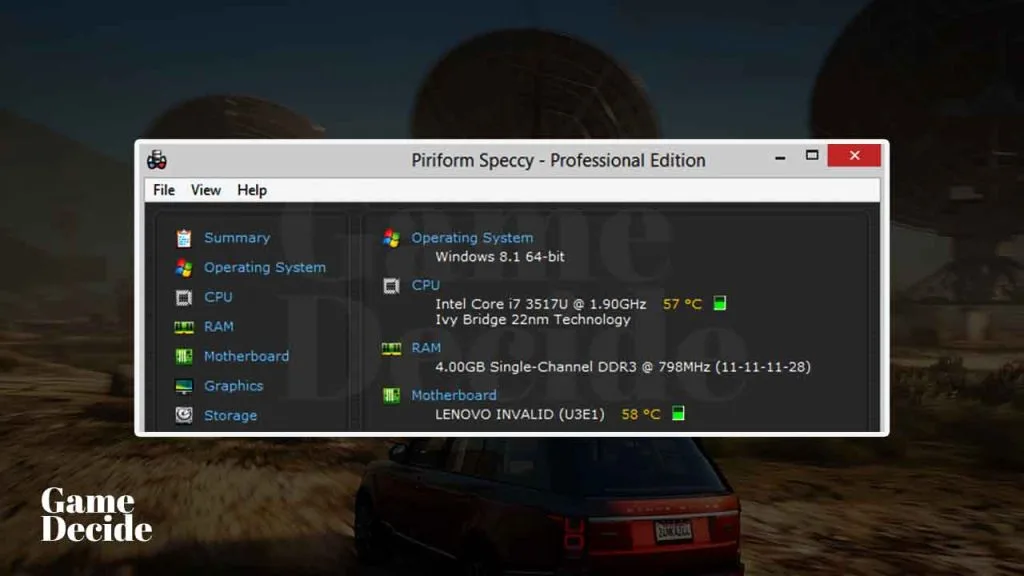
Speccy is a software utility developed by Piriform that provides detailed information about the hardware and software components of a computer. Similar to CPU-Z app It is also a useful tool for anyone who wants to know more about their computer’s specifications, including the CPU, RAM, hard drive, and more.
Table of Contents
You can also check graphics card details similar to GPU-Z tool which is an advance graphic specs checking tool. One of the reasons you should consider downloading Speccy is that it provides an easy-to-read interface that makes it simple to navigate and understand the data it provides.
Another benefit of using Speccy is that it can help you troubleshoot issues that may be related to your hardware components. If you are experiencing performance problems, overheating, or other issues, Speccy can help you identify potential hardware problems and take steps to address them. Whether you are a beginner or an advanced user, Speccy can give you the information you need to make informed decisions about upgrading or optimizing your computer.
Speccy Features
Speccy is a system information tool that provides detailed information about your computer’s hardware and software components. Some of the key features of Speccy include:
- System Information: Speccy provides detailed information about your computer’s operating system, CPU, RAM, motherboard, graphics card, hard drives, optical drives, audio, peripherals, and network adapters.
- Real-time Monitoring: Speccy can monitor your computer’s CPU, GPU, and hard drive temperatures in real-time, as well as track changes in these temperatures over time.
- Benchmarking: Speccy can run benchmarks on your computer’s CPU, RAM, and hard drives, allowing you to compare your system’s performance to other similar systems.
- Save and Share Reports: Speccy allows you to save your system information in a report format for future reference, and also allows you to share your system information with others.
- Portable Version: Speccy also offers a portable version that can be run from a USB drive, making it easy to gather system information on multiple computers without the need for installation.
Speccy is a comprehensive system information tool that can help you diagnose hardware problems, monitor system performance, and optimize your computer for better performance.
If you are looking to check full details of your graphic card we recommend using GPU-Z software which is a free and perfect program to check graphic requirements.
How to Install Speccy?
Here are the steps to install Speccy on your Windows PC:
- Download the Speccy tool from the download section.
- Click on the “Download” button and select the version of Speccy that is compatible with your Windows operating system.
- Once the download is complete, double-click on the installation file to begin the installation process.
- The Speccy installer will open. Click on the “Install” button to proceed with the installation.
- Speccy will ask if you would like to install the free trial of CCleaner Professional. If you do not want to install the free trial, uncheck the box and click “No Thanks”.
- Once the installation is complete, click “Run Speccy” to launch the application.
- Speccy will display detailed information about your computer’s hardware and software components.
You can also choose to install Speccy as a portable version, which can be run from a USB drive without installation. To download the portable version of Speccy, visit the official website and select “Portable” under the download options.
Note: Speccy may offer to install additional software during the installation process, so be sure to read the prompts carefully and opt-out of any additional software that you do not want to install.
Download Section
You can download Speccy from the below button.
If you are unable to download Speccy use this mirror download and use 7zip to extract and install.
Alternative App: CPU-Z – Check Your System Information
FAQ’s
Here are some frequently asked questions and answers about Speccy:
What is Speccy used for?
Speccy is a system information tool that displays detailed information about the hardware and software components of your computer. It can be used to check your computer’s specifications, monitor your system temperature, and troubleshoot hardware and software issues.
Is Speccy free to use?
Yes, Speccy is available as a free version that can be used to view your computer’s hardware and software specifications. However, there is also a paid version that includes additional features such as automatic updates, real-time monitoring, and priority support.
Is Speccy safe to use?
Yes, Speccy is a safe and trustworthy software developed by Piriform, the same company that created the popular CCleaner software. However, as with any software, it’s important to download it from a reputable source and be cautious of any prompts or offers during the installation process.
What information does Speccy display?
Speccy displays information about your computer’s CPU, motherboard, RAM, graphics card, storage devices, operating system, and more. It also provides real-time temperature readings for your CPU and graphics card.
How often should I use Speccy to check my system information?
It’s a good idea to use Speccy to check your system information periodically, especially if you’re experiencing hardware or software issues. However, there’s no set schedule for how often you should use it – it really depends on your needs and usage habits.
Can I export the information displayed in Speccy?
Yes, you can export the information displayed in Speccy to a text file or XML file, which can be useful for sharing your system specifications with others or for troubleshooting purposes.
Is Speccy compatible with all versions of Windows?
Speccy is compatible with Windows 10, 8, 7, Vista, and XP, both 32-bit and 64-bit versions.
If you have a question feel free to ask in the comments.