

Download Driver Booster 12 latest version to easily install and update drivers for your motherboard, graphics card, and other devices on your Windows PC. Keep your system running smoothly!
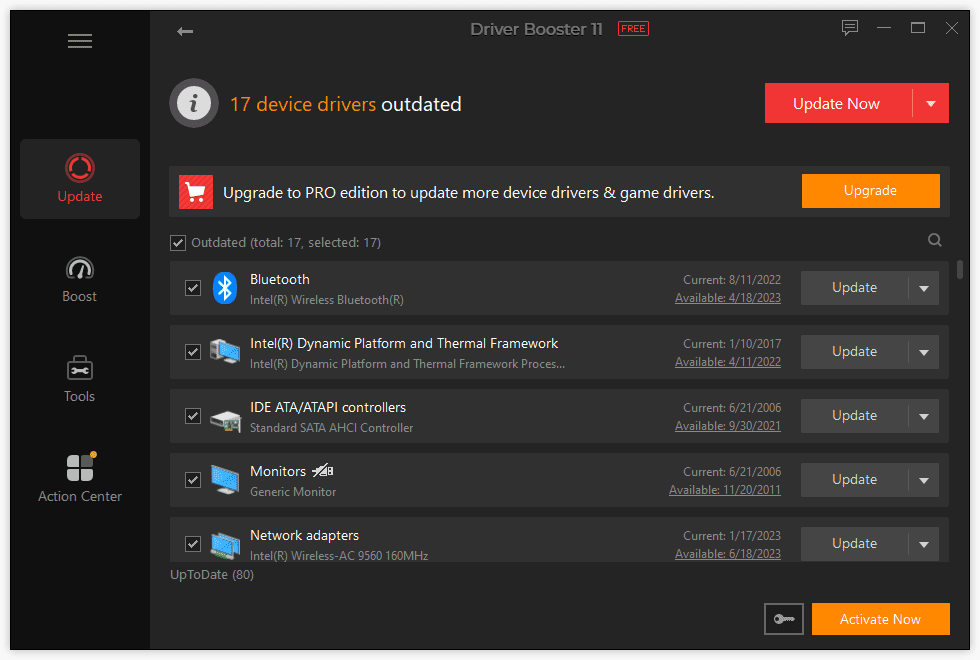
Driver Booster 12 is a powerful tool designed to help users automatically install and update drivers for their motherboard, graphics card, and other computer devices on a Windows PC. Outdated or missing drivers can cause system instability and performance issues, but with Driver Booster 12, you can quickly scan your system and get the latest drivers for your hardware.
The software is user-friendly and allows for a one-click update process, making it easy for both beginners and advanced users to keep their system up-to-date. Driver Booster 12 supports a wide range of devices, including motherboards, graphics cards, network adapters, audio devices, and more. It also offers backup and restore features, ensuring that you can safely update or roll back drivers if necessary.
You may like: Download GeForce Experience
Features of Driver Booster 12
- Automatic Driver Updates: Driver Booster 12 automatically scans your system for outdated, missing, or faulty drivers and updates them with the latest versions, saving time and effort.
- Wide Device Compatibility: It supports a wide range of devices, including motherboards, graphics cards, sound cards, network adapters, printers, and more, ensuring your entire system stays up-to-date.
- One-Click Update: The software offers a simple, one-click solution to update all drivers at once, making it easy for users to keep their system optimized.
- Driver Backup & Restore: Driver Booster 12 includes a backup and restore feature, allowing users to safely back up existing drivers before updating, and restore them if necessary.
- Offline Driver Updates: If you’re working on a system without internet access, Driver Booster 12 allows you to download driver updates on another PC and install them offline.
- Game Ready Drivers: It provides updates for graphics card drivers, ensuring you have the latest game-ready drivers for improved gaming performance and compatibility with new releases.
- Hardware Detection: Driver Booster 12 can detect over 4,500,000 hardware devices, ensuring that even rare or outdated devices are supported.
- Scheduled Scans: You can schedule regular driver scans, ensuring that your system always remains up-to-date without requiring manual intervention.
- Driver Download & Installation Speed: It boosts download speeds for driver updates, making the update process faster and more efficient.
- Improved System Performance: By keeping drivers up to date, Driver Booster 12 helps improve overall system stability, performance, and security, reducing hardware-related issues.
These features make Driver Booster 12 an essential tool for ensuring your Windows PC runs smoothly and efficiently.
You may like: AMD Software: Adrenalin
If you want to boost system performance, resolve hardware issues, or ensure compatibility with the latest software, Driver Booster 12 is a must-have tool for any Windows PC user.
Download Section
If the above button is not working, download Driver Booster 12 here.
You may like:
How to Update All Intel® Drivers Download, Install and Fix
How to Update AMD Graphics Card Drivers: Install & Fix GPU