

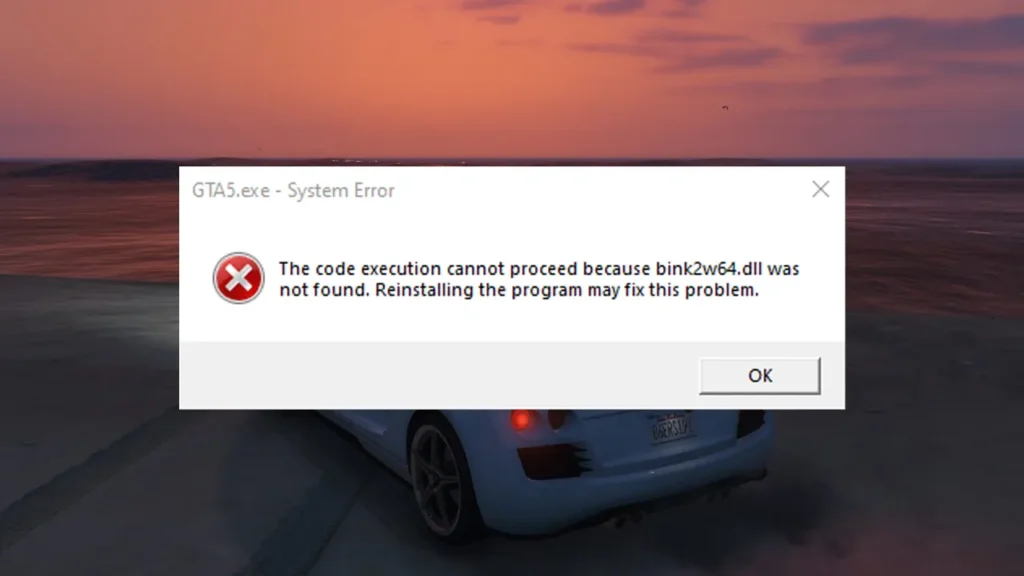
Fix the GTA 5 Legacy “bink2w64.dll was not found” error with easy methods. Learn what causes the issue, why it happens, and how to fix the bink2w64.dll was not found error, a common startup issue in GTA 5 Legacy Edition on PC.
Table of Contents
Similar to GTA V Enhanced bink2w64 Error, when this DLL file is missing, corrupted, or blocked, GTA 5 Legacy fails to launch and throws an error message stating that system error: bink2w64.dll cannot be found or is missing from your computer.
Why Do People Face This Error?
Most players run into this error for one or more of the following reasons:
- Incomplete or corrupted game files, often after a failed update or interrupted download
- Manual modding, where files were deleted or replaced by mistake
- Antivirus or Windows Defender quarantining the DLL file incorrectly
- Switching between GTA 5 Enhanced and Legacy editions, which can cause file mismatches
- Using unofficial fix packs that overwrite core game files
This error is especially common among players who mod GTA 5 Legacy heavily or move game folders manually.
You may like: GTA 5 NaturalVision Lite Custom Settings for Low-End PCs
How to Fix the GTA 5 Legacy bink2w64.dll Error
There are two major solution methods that you can follow to solve the bink2w64.dll was not found error in Grand Theft Auto V Legacy Edition on PC:
Method 1: Verify Game Files (Recommended & Safest)
Verifying game files is the best and safest fix.
Steam:
- Open Steam
- Go to Library
- Right-click Grand Theft Auto V
- Select Properties → Installed Files
- Click Verify integrity of game files
Epic Games Launcher / Rockstar Launcher users can do the same via their game settings. This process checks for missing or corrupted files and re-downloads bink2w64.dll automatically.
You may like: GTA Offline: The Mansion Raid Heist
Method 2: Restore the DLL from Quarantine
Sometimes antivirus software falsely flags the file.
- Open your antivirus or Windows Security
- Check Quarantine / Protection History
- Restore
bink2w64.dllif it was blocked - Add the GTA 5 folder to exclusions
- Restart your PC and launch the game
You may like: Native Mod Menu [ASI] (Enhanced)
Method 3: Using a Fix File (Only If Verification Fails)
If verification does not work, some users choose to manually replace the file.
- Download the missing files pack.
- Place
bink2w64.dllin the root. - Avoid random DLL download sites — many contain malware
- Run the game normally.
This method should be a last resort, not the first option.
You may like: Script Hook V .NET Enhanced
Important Notes for GTA 5 Legacy Users

- Do not mix Enhanced and Legacy game files
- Always back up your game folder before modding
- Keep mods updated after game patches
- Verifying files will not delete your saves
You may like: GTA 5 NaturalVision Lite Custom Settings for Low-End PCs
Final Thoughts
The GTA 5 Legacy bink2w64.dll was not found error is usually caused by missing or corrupted game files, often due to modding or antivirus interference.
The fastest and safest fix is verifying game files, while manual DLL fixes should only be used as a last resort. Once resolved, Grand Theft Auto 5 Legacy should launch normally without further issues.
You may like: Custom Graphics Tag Settings in GTA V
Download Section
Installation Video
You may like: GTA V Enhanced bink2w64 Fix
FAQ’s
Frequenlty Asked Questions:
What does bink2w64.dll do in GTA 5 Legacy?
The bink2w64.dll file handles video playback in GTA 5 Legacy Edition, including intro logos, cutscenes, and certain scripted scenes. Without it, the game cannot start properly.
Is bink2w64.dll error caused by mods?
Yes, in many cases. Mods can overwrite, delete, or conflict with core files, especially if they are outdated or installed incorrectly.
Will verifying game files remove my mods?
Yes, verifying files may remove or overwrite mods that modify core files. You may need to reinstall mods afterwards.
Does this error affect GTA Online?
The error prevents the game from launching at all, so both Story Mode and Online are affected until it is fixed.
Is this error specific to GTA 5 Legacy?
It is far more common in the Legacy edition, especially for users switching between versions or using older mods. Check the Game Decide website for additional resources.

1 Comment
bro password