


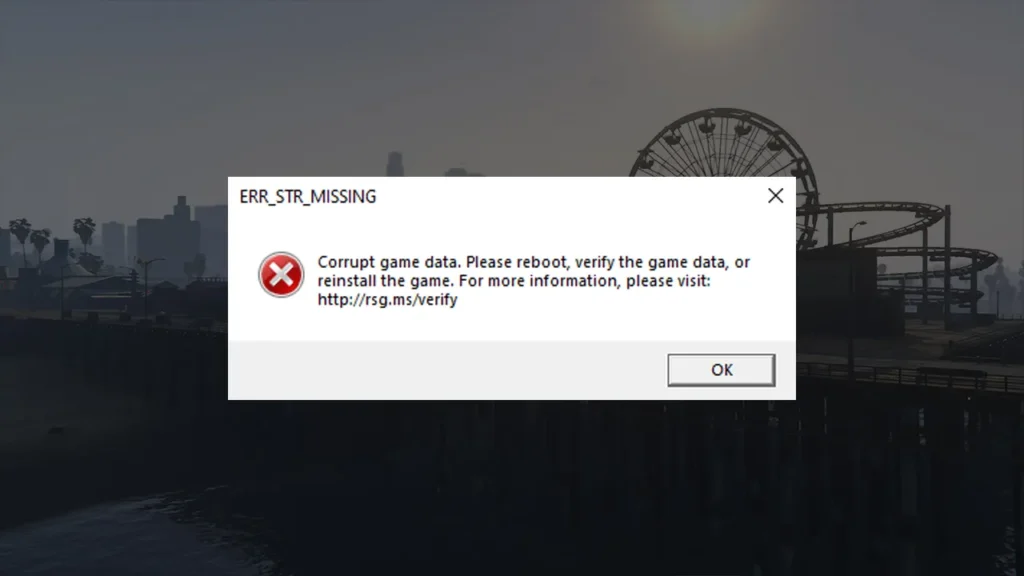
If you’re launching GTA V Enhanced on PC and see the error err_str_missing followed by corrupt game data, it means the game is trying to load files that are either missing or damaged.
Table of Contents
This usually stops the game from opening completely and can appear after an update, a crash, or an interrupted download. Luckily, this error is very fixable and rarely means anything is wrong with your PC.
You may like: Download NaturalVision Lite GTA V Legacy Edition: NVE Low PC
What Causes the err_str_missing Corrupt Game Data Error?
This error normally happens because of:
- Corrupted or missing GTA V Enhanced files
- Interrupted downloads or updates
- Mods or modified game files
- Antivirus deleting game files
- Installing or updating the game incorrectly
- Conflicts between launchers
Understanding the cause helps you fix it properly and stop it coming back.
You may like: GTA Offline: The Mansion Raid Heist | GTA 5 MODS
GTA V Enhanced err_str_missing Corrupt Game Data Solution:
Below is a complete step-by-step guide to get GTA V Enhanced running again:
- Close GTA V and restart your PC
- Launch Rockstar Games Launcher as administrator
- Verify GTA V Enhanced game files using Steam, Epic Games Launcher, or Rockstar Launcher
- Remove all mods and custom files, including the mods folder and dinput8.dll
- Check your antivirus or Windows Defender quarantine and restore any GTA V files
- Add exclusions for the GTA V, Rockstar Games, and Steam or Epic Games folders
- Make sure GTA V Enhanced is fully downloaded and updated with enough free disk space
- Confirm the game is installed on the correct internal drive and hasn’t been moved manually
- Try updating the game with missing files using the video tutorial
- Reinstall Rockstar Games Launcher if file errors keep appearing
If the issue still persists, reinstall GTA V Enhanced completely as a final resort.
You may like: Packfile Limit Adjuster Enhanced Latest for GTA 5 Enhanced

Final Thoughts
The GTA V Enhanced err_str_missing corrupt game data error is almost always caused by missing or damaged files. In most cases, verifying game files and removing mods fixes it straight away.
Avoid interrupting downloads, keep antivirus exclusions in place, and always let updates finish fully to prevent this error in future.
You may like: Native Mod Menu [ASI] (Enhanced)
Installation Video
Download Section
FAQ’s
Frequently Asked Questions:
What does err_str_missing corrupt game data mean in GTA V Enhanced?
The err_str_missing corrupt game data error means GTA V Enhanced is missing one or more required files or is trying to load corrupted data. This usually happens after an interrupted download, a failed update, or when important game files have been modified or deleted.
Why am I getting the err_str_missing error when launching GTA V Enhanced?
This error typically appears when GTA V Enhanced files are damaged, incomplete, or blocked by antivirus software. Mods, manual file changes, or moving the game folder can also cause the launcher to detect the game data as corrupt.
How do I fix err_str_missing corrupt game data in GTA V Enhanced?
The most reliable fix is to verify the game files through Steam, Epic Games Launcher, or Rockstar Games Launcher. This scans the installation and re-downloads any missing or corrupted files causing the error.
Can mods cause the err_str_missing error in GTA V Enhanced?
Yes, mods are a very common cause of this error. Outdated or broken mods can interfere with core game files, leading to missing data errors. Removing all mods and restoring the game to a clean state usually fixes the issue.
Does verifying game files delete my GTA V progress?
No, verifying game files does not delete your story mode saves or GTA Online progress. It only checks and repairs core game files, so your progress remains safe.
Can antivirus software cause corrupt game data errors?
Yes, antivirus or Windows Defender can mistakenly delete or block GTA V Enhanced files during updates. This can result in missing or corrupt data errors. Adding the game folders to antivirus exclusions helps prevent this.
Why does the err_str_missing error keep coming back after fixing it?
If the error keeps returning, it’s often because mods are still installed, antivirus software is still interfering, or the game isn’t fully updating. Making sure the game is clean and exclusions are set usually stops the problem from repeating.
Is reinstalling Rockstar Games Launcher necessary for this error?
Reinstalling Rockstar Games Launcher isn’t always necessary, but it can help if the launcher is causing file detection issues. A fresh launcher install often resolves repeated err_str_missing errors.
Should I reinstall GTA V Enhanced if nothing else works?
Reinstalling GTA V Enhanced should only be done as a last resort. Most err_str_missing errors are fixed by verifying files, removing mods, and fixing antivirus conflicts without needing a full reinstall.
Does err_str_missing error affect GTA Online as well?
Yes, the err_str_missing corrupt game data error prevents GTA V Enhanced from loading entirely, which means GTA Online won’t work until the issue is fixed.
You may like: Script Hook V .NET Enhanced for GTA 5 Enhanced Edition


