
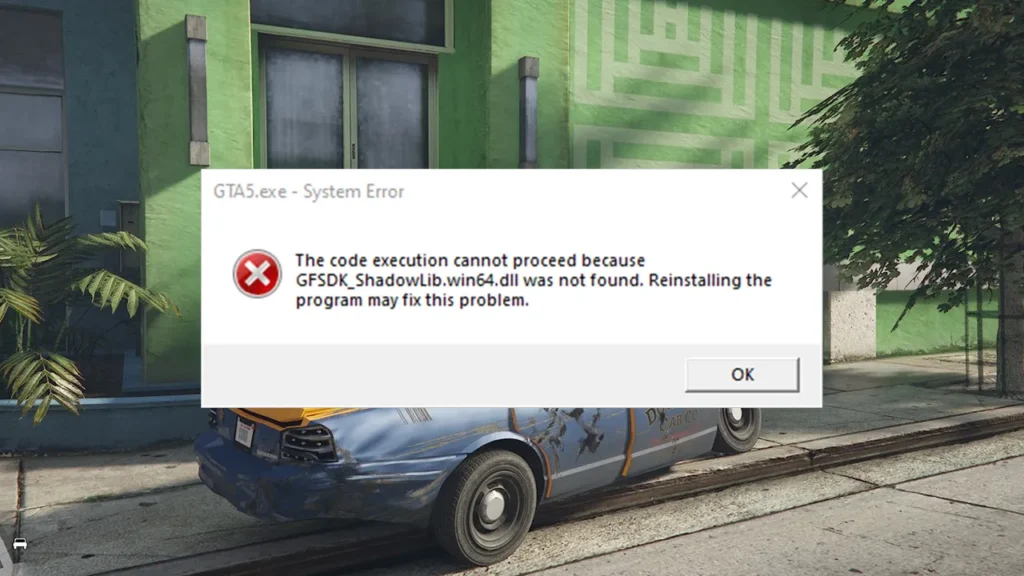
Learn how to fix the GTA 5 Legacy system error “GFSDK_ShadowLib.win64.dll was not found” on PC. Find out what causes the error, why it happens, and how to fix it safely by verifying game files or restoring missing NVIDIA DLLs.
Table of Contents
The GFSDK_ShadowLib.win64.dll was not found error is a common system message that stops GTA 5 Legacy from launching on PC. This file is part of NVIDIA’s GameWorks Shadow Library, which GTA V uses for advanced shadow rendering and lighting effects.
Why Do Players Get This Error?
Most players encounter this issue because of one or more of the following reasons:
- Corrupted or missing game files after an update or crash
- Heavy modding, especially graphics mods that replace core files
- Switching between GTA 5 Enhanced and Legacy editions
- Antivirus software deleting or blocking the DLL file
- Manual file changes in the GTA 5 root directory
This error is especially common among Legacy players who use older mods or reshade-style graphic tweaks.
How to Fix the GTA 5 Legacy GFSDK_ShadowLib Error
When the game cannot find this DLL file, it fails to start and throws an error before reaching the main menu. the following solutions will help you:
Method 1: Verify Game Files (Best Fix)
This is the safest and most reliable solution.
Steam users:
- Open Steam
- Go to Library
- Right-click Grand Theft Auto V
- Click Properties → Installed Files
- Select Verify integrity of game files
For Epic Games Launcher or Rockstar Launcher, use the Verify option in the game settings. This will automatically re-download GFSDK_ShadowLib.win64.dll if it’s missing or damaged.
Method 2: Check Antivirus & Restore the File
Sometimes antivirus software wrongly flags the file.
- Open Windows Security or your antivirus app
- Go to Protection History / Quarantine
- Restore
GFSDK_ShadowLib.win64.dllif found - Add the GTA 5 folder to exclusions
- Restart your PC and try launching the game again
Method 3: Avoid Random DLL Download Sites
You may see advice online telling you to download the DLL file from random websites. This is not recommended.
- Many DLL download sites contain malware
- Wrong file versions can cause more crashes
- Verifying game files does the same job safely
Only consider manual replacement if you fully trust the source and understand the risk.
Extra Tips for GTA 5 Legacy Players
- Don’t mix files from Enhanced and Legacy editions
- Always back up your game folder before installing mods
- Reinstall mods after verifying game files
- Keep graphics drivers up to date
Final Thoughts
The GTA 5 Legacy GFSDK_ShadowLib.win64.dll was not found error is usually caused by missing or corrupted game files, antivirus interference, or mod conflicts.
The fastest and safest fix is verifying your game files through your launcher. Once restored, GTA 5 Legacy should launch normally without further issues.
Installation Video
Download Section
FAQ’s
Frequently Asked Questions:
What does GFSDK_ShadowLib.win64.dll do?
It’s part of NVIDIA’s GameWorks library and is used by GTA 5 Legacy to handle advanced shadow effects. Without it, the game cannot launch properly.
Is GFSDK_ShadowLib.win64.dll error caused by mods?
Yes, very often. Graphics mods and outdated files are a common cause, especially in the Legacy version of GTA 5.
Does GFSDK_ShadowLib.win64.dll error affect GTA Online?
The game won’t launch at all while this error exists, so both Story Mode and Online are affected.
Is GFSDK_ShadowLib.win64.dll error common on Legacy edition only?
It’s far more common on Legacy, mainly because it uses older libraries and is often heavily modded.