![GTA 5 Enhanced Native Mod Menu [ASI] (Enhanced) latest version download for Grand Theft Auto V Enhanced Trainer Mod on PC.](https://gamedecide.com/wp-content/uploads/2025/10/741d47-NMM_IMG.webp "Native Mod Menu [ASI] (Enhanced)")
The Native Mod Menu [ASI] (Enhanced) is a lightweight, performance-focused menu designed for GTA V Enhanced players who want direct access to essential modding tools without a bulky interface.
Table of Contents
Built natively and completely free from external UI libraries, this menu focuses on speed, stability, and simplicity, delivering just what you need for quick control and smooth gameplay.
![GTA 5 Enhanced Native Mod Menu [ASI] (Enhanced) latest version download for Grand Theft Auto V Enhanced Trainer Mod on PC.](https://gamedecide.com/wp-content/uploads/2025/10/c17469-3240220_343_11zon-1024x576.webp "Native Mod Menu [ASI] (Enhanced)")
Overview
This enhanced version of the Native Mod Menu provides a clean and minimal design that runs directly in the game environment. It’s ideal for players who want to unlock DLC content, customise characters and vehicles, or manage addons with ease.
Every option is streamlined for efficiency, ensuring you spend less time scrolling through menus and more time playing.
Controls
- Controller: Double tap DPAD-RIGHT
- Keyboard: Press PAGE DOWN
You can fine-tune your controls and menu preferences directly in the included .ini configuration file, giving you full freedom to adjust the interface to your liking.
You may like: fwBoxStreamer + DecalsPatch Enhanced
![GTA 5 Enhanced Native Mod Menu [ASI] (Enhanced) latest version download for Grand Theft Auto V Enhanced Trainer Mod on PC.](https://gamedecide.com/wp-content/uploads/2025/10/c17469-3240220_153_11zon-1024x576.webp "Native Mod Menu [ASI] (Enhanced)")
Installation
- Copy both provided files into your main GTA V directory.
- Launch GTA V Enhanced.
- Open the menu using your preferred control input (controller or keyboard).
Your settings will automatically save for future sessions, so you can jump straight into gameplay without reconfiguring.
Key Features
- Unlock all DLC vehicles instantly.
- Play any scenario animations available in the game.
- Access a full player customisation menu for quick outfit or character changes.
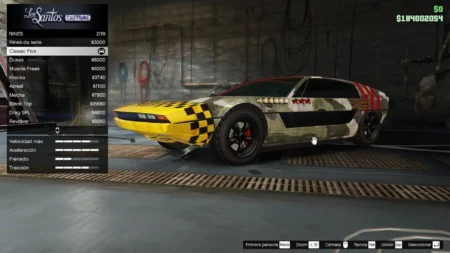
- Modify your ride through the vehicle customisation menu.
- Auto-load and save your player settings between sessions.
- Teleport to saved locations or any selected waypoint on the map.
- Spawn both original and addon vehicles.
- Spawn addon peds or custom character models for extra variety.
- Fully customisable appearance and colours for the menu interface.
You may like: Rampage Trainer (Enhanced & Legacy)
![GTA 5 Enhanced Native Mod Menu [ASI] (Enhanced) latest version download for Grand Theft Auto V Enhanced Trainer Mod on PC.](https://gamedecide.com/wp-content/uploads/2025/10/b40037-nmmini.webp "Native Mod Menu [ASI] (Enhanced)")
Addon Peds & Vehicles
Loading your custom content has never been easier.
- Open the Addons category from the menu.
- Scroll down and select the last item on the list.
- Type the name of your addon (ped or vehicle) and load it instantly.
This feature offers instant access to custom models without needing to restart or reload the game.
Final Thoughts
If you prefer speed, control, and simplicity, this mod is built for you. The design removes all unnecessary clutter, giving you fast access to what truly matters, modding freedom with minimal performance impact.
It’s an ideal choice for GTA V Enhanced players who want a powerful, lightweight mod menu that blends seamlessly with the game.
You may like: Heap Adjuster Enhanced
Download Section
Releases
| Version | Files |
|---|---|
| v2.9 | Download |
| v2.8 | Download |
| v2.7 | Download |
| v2.6 | Download |
| v2.5 | Download |
| v2.4 | Download |
| v2.3 | Download |
| v2.2 | Download |
| v2.1 | Download |
| v2.0 | Download |
| v1.9 | Download |
| v1.8 | Download |
| v1.7 | Download |
| v1.6 | Download |
| v1.5 | Download |
| v1.4 | Download |
| v1.3 | Download |
| v1.2 | Download |
| v1.1 | Download |
| v1.0 | Download |
Last Updated: Monday, 13 July 2026
Installation Video: