

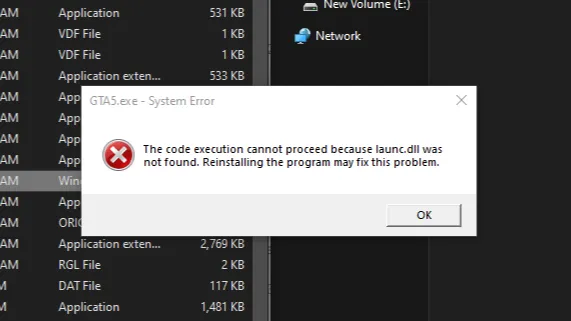
Today we will fix GTA 5 Legacy Edition, encountering the frustrating system error message: “The code execution cannot proceed because launc.dll was not found. Reinstalling the program may fix this problem.”
Table of Contents
This error usually prevents GTA V Legacy from launching at all and is most common after a failed update, corrupted files, antivirus interference, or an incomplete installation of Rockstar Games Launcher.
The launc.dll file is a critical dynamic link library used by Rockstar Games Launcher to initialise Grand Theft Auto V Legacy Edition. When this file is missing, damaged, or blocked, Windows cannot execute the game properly, resulting in the error.
You may like: GTA 5 NaturalVision Lite Custom Settings for Low-End PCs
How to Solve launc.dll Error in GTA 5 Legacy?
The launc.dll missing error in GTA 5 Legacy can occur for several reasons. Antivirus or Windows Defender may falsely detect the file as a threat and quarantine it.
In other cases, game files become corrupted due to interrupted downloads, power cuts, or improper shutdowns. Installing mods incorrectly, especially outdated Script Hook V or launcher-related files, can also trigger this issue.
You may like: GTA Offline: The Mansion Raid Heist
Additionally, using an old version of Rockstar Games Launcher or Social Club may cause compatibility problems. Here are some steps to troubleshoot your game:
Method 1: Verify GTA 5 Game Files
The first and safest fix is to verify your Grand Theft Auto V Legacy game files through the launcher you use.
- If you are using Rockstar Games Launcher, open it, go to Settings, select GTA 5, and choose Verify Integrity.
- For Steam, right-click GTA 5 in your library, open Properties, go to Installed Files, and click Verify integrity of game files.
- For Epic Games Launcher, click the three dots next to GTA 5 and select Verify.
This process automatically re-downloads missing files, including launc.dll, and fixes corrupted data.
You may like: Native Mod Menu [ASI] (Enhanced)
Method 2: Check Antivirus and Windows Defender
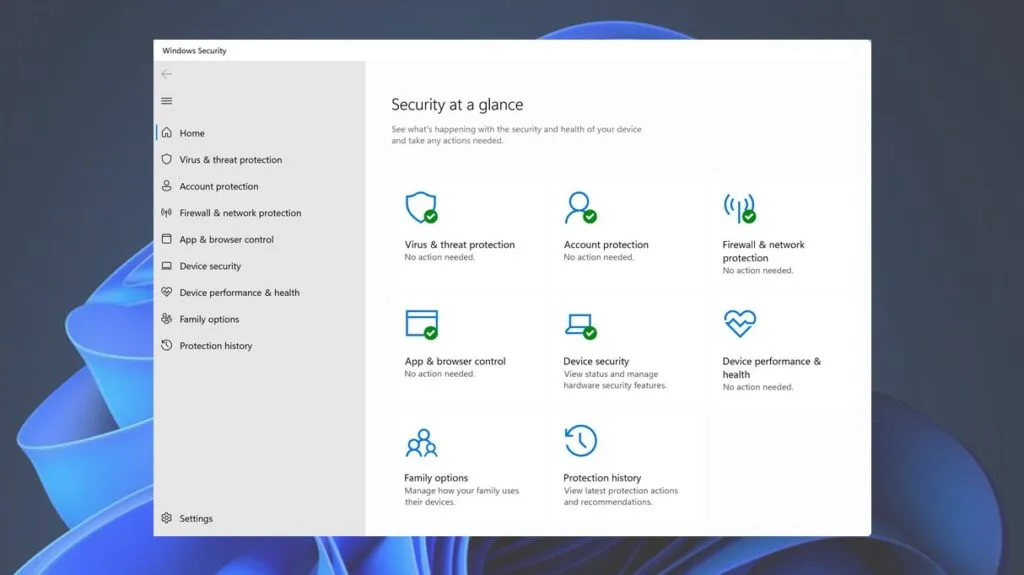
Antivirus software frequently causes the launc.dll not found error by quarantining the file. Open your antivirus dashboard and check the quarantine or protection history. If launc.dll is listed, restore it and add the GTA 5 and Rockstar Games Launcher folders to exclusions.
For Windows Defender, open Windows Security, go to Virus & threat protection, then Protection history, and allow the blocked file if present. Disabling antivirus temporarily during installation can also prevent the error from returning.
You may like: Script Hook V .NET Enhanced for GTA 5 Enhanced Edition
Method 3: Update Drivers or Game Files
Outdated Windows components or graphics drivers can sometimes conflict with Rockstar services. Ensure Windows is fully updated and install the latest GPU drivers from NVIDIA or AMD. Restart your system after updates and try launching GTA 5 Legacy again.
Another method is to update the game files with fix files. This will fix any missing file errors and even repair any broken files that are causing this error in GTA 5 Legacy on PC. You can follow these steps to troubleshoot that:
- Update your Drivers
- Restart your pc and run the game
- Go with the fix method (experiment)
- Obtain fix from download section
- Watch tutorial video for Installation
- Run the game
You may like: GTA V Custom 100 Motorbikes Pack (Add-ons)
Download Section
| Version | Files |
|---|---|
| GTA V Legacy Fix | Download |
If the above link is not working for GTA V Original Edition, download it here.
Installation Video
FAQs
Frequently Asked Questions:
What is launc.dll in GTA 5 Legacy?
Launc.dll is a system file used by Rockstar Games Launcher to start and authenticate GTA 5 Legacy Edition. Without this file, Windows cannot execute the game, resulting in a launch failure.
Why does GTA 5 say launc.dll was not found?
This error appears when the launc.dll file is missing, corrupted, or blocked by antivirus software. It often happens after a failed update, incomplete installation, or false virus detection.
Can mods cause the launc.dll error?
Yes, incompatible or outdated mods, especially Script Hook V or launcher-related files, can interfere with Rockstar services and cause the launc.dll error in GTA 5 Legacy.
Does reinstalling GTA 5 fix the launc.dll issue?
In most cases, reinstalling Rockstar Games Launcher fixes the problem without needing to reinstall the entire game. Full reinstallation of GTA 5 should only be a last resort.
Does this error affect GTA 5 Enhanced Edition?
The launc.dll error mainly affects GTA 5 Legacy Edition, but similar launcher-related issues can occur in Enhanced Edition if Rockstar Games Launcher files are corrupted.
You may like: fwBoxStreamer, DecalsPatch: GTA 5 Enhanced Mods
1 Comment
password