
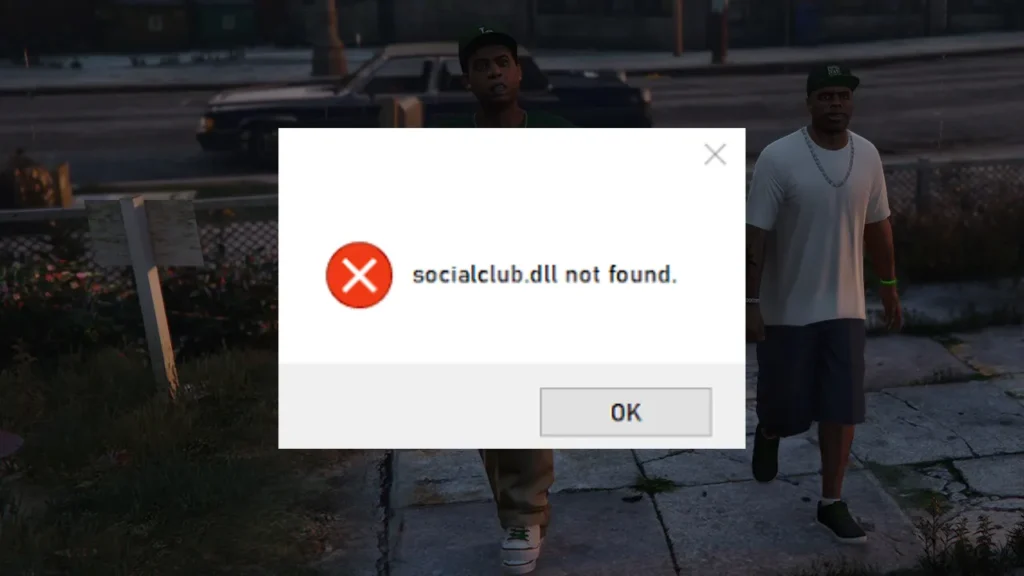
If you’re trying to launch GTA 5 Legacy and get hit with the error “SocialClub.dll not found” or “The code execution cannot proceed because SocialClub.dll was not found”, you’re dealing with a broken or missing Rockstar Social Club file.
Table of Contents
This error stops GTA 5 from launching completely and usually appears after a failed update, corrupted install, or antivirus interference. The good news is that we will share safer and proper ways to fix it.
Related Article: GTA 5 Enhanced RUNE Error: socialclub.dll Not Found
What Causes the SocialClub.dll Not Found Error?
This issue usually happens due to:
- Corrupted Rockstar Social Club installation
- Antivirus deleting or quarantining SocialClub.dll
- Incomplete GTA 5 or Rockstar Launcher update
- Missing or damaged system files
- Launching GTA 5 Legacy from the wrong exe
- Conflicts between Steam, Epic, and Rockstar Launcher
Understanding the cause helps avoid the error coming back.
You may like: How to Check GTA 5 Version? (GTA V Edition Finder)
How to Fix GTA 5 Legacy SocialClub.dll Not Found
Here are easy to follow ways to fix missing or broken Rune Error: Could not find SocialClub.dll or orig_socialclub.dll was not found (The code execution cannot proceed) for PC users:
- Restart your PC and launch Rockstar Games Launcher as administrator to rule out permission issues
- Verify GTA 5 Legacy game files using Steam, Epic Games Launcher, or Rockstar Games Launcher to restore missing DLL files
- Uninstall and reinstall Rockstar Games Launcher, as SocialClub.dll is included with the launcher
- Check your antivirus quarantine and restore SocialClub.dll if it was removed by mistake
- Add exclusions for the Rockstar Games folder, GTA 5 installation folder, and Steam or Epic Games folders in your antivirus
- Uninstall Rockstar Games Social Club from Control Panel and let the launcher reinstall it automatically
- Install or repair Microsoft Visual C++ (x64 version)
- Make sure GTA 5 Legacy is launched through the launcher, not directly from GTA5.exe
- Confirm the game is installed on a supported internal drive and hasn’t been moved manually
- Try copying the missing files to the game root, which you can obtain from this page
- If the error still persists, reinstall GTA 5 completely after deleting leftover Rockstar and GTA 5 folders
You may like: GTA Offline: The Mansion Raid Heist | GTA 5 MODS
Final Thoughts
The GTA 5 Legacy SocialClub.dll not found error is almost always linked to a broken Rockstar Social Club or launcher installation. In most cases, verifying game files or reinstalling Rockstar Games Launcher fixes it quickly.
You may like: How to Get More than 30fps in GTA 5
Download Section
Note:
- Premium resources are intended for users who own a legitimate copy of GTA V through the Rockstar Games Launcher, Steam, Epic Games Store, or another authorized platform.
- Free resources are intended for users who obtained the game from other sources on the internet.
You may also like: Community Script Hook V .NET Nightly Latest
FAQ’s
Frequently Asked Questions:
What does the SocialClub.dll not found error mean in GTA 5 Legacy?
The SocialClub.dll not found error means GTA 5 Legacy cannot locate a required Rockstar Social Club file needed to launch the game. This usually happens when the Social Club installation is corrupted, deleted by antivirus software, or wasn’t installed correctly during a game or launcher update.
Why is SocialClub.dll missing when I try to open GTA 5 Legacy?
SocialClub.dll is usually missing because antivirus software has quarantined it, or because Rockstar Games Launcher or Social Club failed to update properly. Interrupted downloads, corrupted files, or manual changes to the game folder can also cause the file to disappear.
How can I fix the SocialClub.dll not found error in GTA 5 Legacy?
The best way to fix this error is to verify GTA 5 Legacy game files or reinstall Rockstar Games Launcher, as SocialClub.dll is included with the launcher. This safely restores the missing file without needing to download anything manually.
Can antivirus software cause SocialClub.dll errors in GTA 5?
Yes, many antivirus programs mistakenly flag SocialClub.dll as a threat and remove it. When this happens, GTA 5 Legacy won’t launch. Restoring the file from quarantine and adding the Rockstar Games folder to exclusions usually prevents the error from happening again.
Is it safe to download SocialClub.dll from the internet?
No, downloading SocialClub.dll from third-party websites is not recommended. These files may be outdated, incompatible, or contain malware. Rockstar Games Launcher automatically installs the correct version, making manual downloads unnecessary and risky.
Does verifying game files restore SocialClub.dll automatically?
Yes, verifying GTA 5 Legacy game files through Steam, Epic Games Launcher, or Rockstar Games Launcher will automatically re-download SocialClub.dll if it’s missing or corrupted, making this one of the safest fixes.
Will reinstalling Rockstar Games Launcher fix the problem?
In most cases, reinstalling Rockstar Games Launcher completely fixes the SocialClub.dll not found error. Since Social Club is bundled with the launcher, a fresh install ensures all required DLL files are restored correctly.
Can missing Visual C++ files cause SocialClub.dll errors?
Yes, missing or corrupted Microsoft Visual C++ Redistributables can trigger DLL-related errors in GTA 5 Legacy. Installing the latest Visual C++ packages helps ensure SocialClub.dll and other game files work properly.
Why does GTA 5 Legacy still not launch after fixing the DLL error?
If GTA 5 Legacy still doesn’t launch, there may be additional issues such as corrupted game files, incorrect install paths, or launcher permission problems. Running the launcher as administrator and re-verifying game files usually resolves this.
Should I reinstall GTA 5 if the error keeps coming back?
Reinstalling GTA 5 should only be considered as a last resort. Most SocialClub.dll errors are fixed by repairing the launcher or Social Club installation, without needing to reinstall the entire game.