
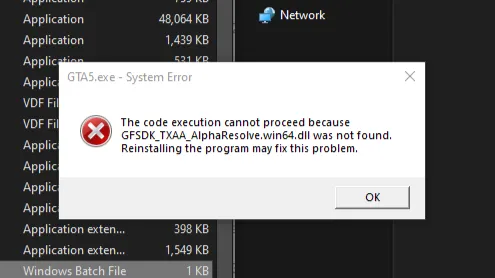
If you are facing the GTA5.exe System Error stating “The code execution cannot proceed because GFSDK_TXAA_AlphaResolve.win64.dll was not found”, you are not alone. This is a common issue affecting GTA 5 Legacy on PC, especially after installing mods, updating graphics drivers, or switching between GTA 5 Enhanced and Legacy editions.
Table of Contents
The file GFSDK_TXAA_AlphaResolve.win64.dll is part of NVIDIA’s TXAA (Temporal Anti-Aliasing) technology, which Grand Theft Auto V relies on for certain graphical functions. When this DLL file goes missing or becomes corrupted, the game fails to launch and throws a system error.
You may like: GTA 5 NaturalVision Lite Custom Settings for Low-End PCs
How to Fix GTA 5 Legacy Error: GFSDK_TXAA_AlphaResolve.win64.dll
This Grand Theft Auto V error usually occurs due to missing or damaged game files, often caused by incomplete updates, mod conflicts, or manual file deletion. Players who use graphics mods, ENB, ReShade, Script Hook V, or mod menus are more likely to encounter this issue.
In some cases, switching between GTA 5 Enhanced and Legacy can also overwrite or remove required DLL files. Outdated or corrupted NVIDIA graphics drivers may also trigger the error, as the DLL is closely linked to NVIDIA’s rendering features.
You may like: GTA Offline: The Mansion Raid Heist
Method 1: Verify GTA 5 Game Files (Recommended)
The safest and most effective fix is to verify the integrity of GTA 5 game files using your game launcher. This process scans your installation and automatically re-downloads any missing or corrupted files, including GFSDK_TXAA_AlphaResolve.win64.dll.
For Steam, Rockstar Games Launcher, or Epic Games Launcher, use the built-in Verify or Repair option. Once completed, restart your PC and launch GTA 5 Legacy again.
You may like: Native Mod Menu [ASI] (Enhanced)
Method 2: Check Mods and Custom Files
If you are using mods, temporarily remove all mod files from the GTA 5 directory, including dinput8.dll, ScriptHookV.dll, ENB files, and graphics mods.
Launch the game in a clean state to confirm whether a mod is causing the issue. Once the game works, reinstall mods one by one to identify the conflicting file.
You may like: Script Hook V .NET Enhanced for GTA 5 Enhanced
Method 3: Apply Solution (Experiment)
This method is to update the game files with fix files. This will fix any missing GFSDK_TXAA_AlphaResolve.win64.dll file errors and even repair any broken files that are causing this error in GTA 5 Legacy on PC.
You can follow these steps to troubleshoot that:
- Update your Drivers
- Restart your pc and run the game
- Go with the fix method (experiment)
- Obtain fix from download section
- Watch tutorial video for Installation
- Run the game
You may like: GTA V Custom 100 Motorbikes Pack (Add-ons)
Method 4: Reinstall GTA 5 Legacy (Last Resort)
If none of the above solutions work, a clean reinstall of GTA 5 Legacy may be necessary. This ensures all required DLL files and dependencies are restored correctly. Always back up your save files before reinstalling.
You may like: fwBoxStreamer, DecalsPatch: GTA 5 Enhanced Mods
Download Section
| Version | Files |
|---|---|
| GTA 5 Legacy | Download |
If the above link is not working, you can download the fix here.
Installation Video
FAQ’s
Frequently Asked Questions:
What is GFSDK_TXAA_AlphaResolve.win64.dll in GTA 5?
GFSDK_TXAA_AlphaResolve.win64.dll is an NVIDIA TXAA-related dynamic link library used by GTA 5 Legacy to handle specific anti-aliasing and graphical rendering processes. Without it, the game cannot initialise properly.
Is the GFSDK_TXAA_AlphaResolve.win64.dll error dangerous?
No, the GTA 5 Legacy error itself is not dangerous. It simply means a required file is missing or corrupted. However, downloading DLL files from random websites is unsafe and should be avoided.
Can mods cause this GTA 5 Legacy DLL error?
Yes, graphics mods, ENB presets, ReShade, or incorrectly installed mods can overwrite or remove required DLL files, leading to this error in GTA 5 Legacy.
Does verifying game files remove mods?
Yes, verifying game files usually restores original files and may remove or overwrite mods. It is recommended to back up your modded files before verifying.
Does this error happen in GTA 5 Enhanced?
This issue mostly affects GTA 5 Legacy, but it can also occur in Enhanced if files are missing or drivers are incompatible. Legacy users report it more frequently.
Should I manually download the missing DLL file?
No, manually downloading DLL files from third-party websites is not recommended, as it can introduce malware or cause further issues. Always restore files through official game launchers or driver installations.
Will reinstalling NVIDIA drivers fix the issue?
In many cases, yes. Since the DLL is linked to NVIDIA TXAA, reinstalling or clean-installing NVIDIA drivers can restore missing components and fix the error.