
Close Menu
  • Home
  • News
  • Mods
  • Guides
  • Tech
What's New?
Download Rooftop Club Naeon [Add-On SP Legacy] GTA 5 Mods

Download Rooftop Club Naeon [Add-On SP Legacy] GTA 5 Mods

November 14, 2026
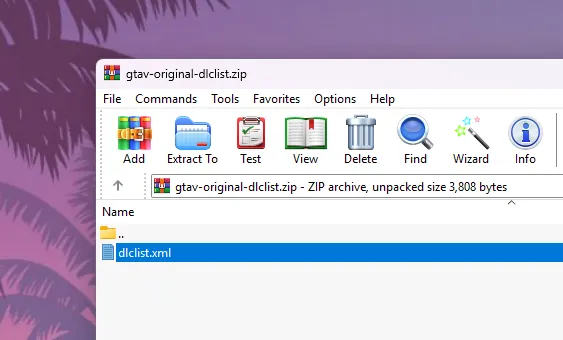
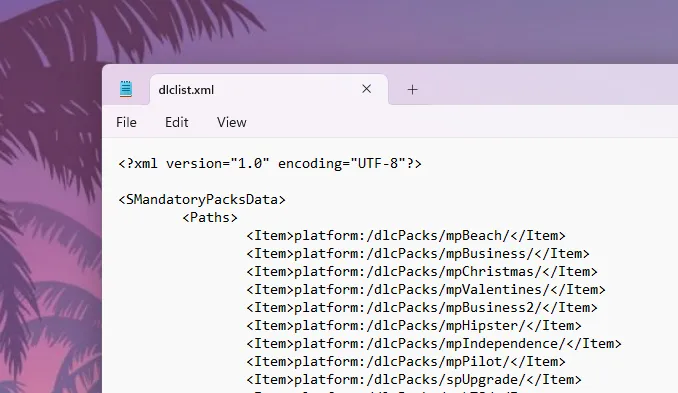
​dlclist.xml (Original Raw File) GTA 5 Enhanced & Legacy

​dlclist.xml (Original Raw File) GTA 5 Enhanced & Legacy

November 14, 2026
Facebook X (Twitter) Instagram YouTube
Saturday, November 14
Game Decide
Facebook X (Twitter) Instagram YouTube
  • Home
  • News
  • Mods
  • Guides
  • Tech
  • Gaming
  • Computer
  • Software Guides
  • Graphic Tutorials
  • GTA V
  • GTA IV
  • Minecraft
  • Red Dead Redemption 1/2
Game Decide
Home»Guides»GTA 5 Tutorials»​dlclist.xml (Original Raw File) GTA 5 Enhanced & Legacy

​dlclist.xml (Original Raw File) GTA 5 Enhanced & Legacy

Updated:November 14, 20263 Mins Read
Share Facebook Twitter Pinterest LinkedIn Tumblr Email Copy Link
​dlclist.xml (Original Raw File) GTA 5 Enhanced & Legacy
Share
Reddit Telegram WhatsApp Email Copy Link

This guide provides step-by-step instructions to help you restore or modify the dlclist.xml file, essential for managing game add-ons and ensuring a smooth modding experience with steps on how to download and install the original dlclist.xml file for the latest version of Grand Theft Auto V (GTA 5) using OpenIV.

Table of Contents

  • Locating the Original dlclist.xml File
    • How to Install dlclist.xml in GTA 5
  • Important Considerations

​The dlclist.xml file in Grand Theft Auto V (GTA 5) is crucial for modding, as it instructs the game on which additional content packs (DLCs) to load. Modders often need to edit this file to include new vehicles, maps, or other add-ons.
​dlclist.xml (Original Raw File) GTA 5 Enhanced & Legacy

However, if the dlclist.xml becomes corrupted or if you need to revert to the original version, it’s essential to know how to restore it.​

Locating the Original dlclist.xml File

The original dlclist.xml is embedded within the game’s encrypted files and isn’t directly accessible through standard file explorers. To access it, you’ll need the OpenIV tool, a robust editor designed for GTA V’s file structure.​

​dlclist.xml (Original Raw File) GTA 5 Enhanced & Legacy

How to Install dlclist.xml in GTA 5

Here are steps to access and restore the original dlclist.xml file using OpenIV for PC, Xbox and PlayStation users:

  1. Install OpenIV: If you haven’t already, download and install OpenIV software.​
  2. Launch OpenIV and Enable Edit Mode: Open the application, select GTA V for Windows, and ensure you’re in “Edit Mode” by toggling the button at the top.​
  3. Navigate to the Original File Location:
    • In OpenIV, go to update > update.rpf > common > data.​
    • Here, you’ll find the dlclist.xml file.​
  4. Create a ‘mods’ Folder (If Not Already Done):
    • To prevent altering the game’s original files, it’s recommended to use a ‘mods’ folder.​
    • In OpenIV, right-click on update.rpf and select “Copy to ‘mods’ folder”. This action will create a replica of the update.rpf in your ‘mods’ directory.​
  5. Edit the dlclist.xml in the ‘mods’ Folder:
    • Navigate to mods > update > update.rpf > common > data.​
    • Right-click on dlclist.xml and choose “Edit”.​
    • Make the necessary modifications, such as adding or removing DLC entries.​
  6. Save and Verify:
    • After editing, save the changes.​
    • Launch GTA V to ensure that the game loads correctly with the modified dlclist.xml.​
​dlclist.xml (Original Raw File) GTA 5 Enhanced & Legacy

Important Considerations

  • Backup: Always back up your existing dlclist.xml before making any changes. This practice ensures you can revert to a working state if something goes wrong.​
  • Syntax Accuracy: When editing the dlclist.xml, ensure that the syntax is correct. Improper formatting can lead to game crashes or DLCs not loading properly.​
  • Using the ‘mods’ Folder: Modifying files within the ‘mods’ folder ensures that the original game files remain untouched, allowing for safer modding and easier troubleshooting.​

By following these steps, you can access, edit, or restore the original dlclist.xml file in GTA V, ensuring a smooth modding experience.

Download Section
You can download resources from here:
EditionFiles
EnhancedDownload
LegacyDownload

Share. Twitter VKontakte Reddit Telegram WhatsApp Email Copy Link
Previous ArticleDownload Throw Props like GTA IV for GTA 5 Mods | Legacy
Next Article Download Rooftop Club Naeon [Add-On SP Legacy] GTA 5 Mods

Related Posts

Download Grand Theft Auto V Update.rpf File (GTA 5 Enhanced & GTA V Legacy)
July 11, 2026

Download GTA V Update.rpf (Enhanced & Legacy) RAW File

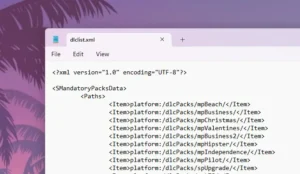
Add GTA 5 DLC Packs in DLCList.xml: Code for RPF Add-ons
February 16, 2026

Add GTA 5 DLC Packs in DLCList.xml: Code for RPF Add-ons

How to Fix err_str_missing corrupt game data error in Grand Theft Auto V Enhanced on PC, and learn missing or corrupted files with simple steps.
February 1, 2026

Fix GTA 5 Enhanced err_str_missing Corrupt Game Data Error

Add A Comment
Leave A Reply Cancel Reply

Suggested Posts
Delete browser search data and keep saved passwords on Windows PC Firefox, Google Chrome, Microsoft Edge, Opera, Brave, Vivaldi, & macOS Apple Safari.

Clearing Your Browser History, Cache and Cookies: Boost Your Browser’s Performance!

April 23, 2023
Scarlet Nexus has sold more than one/2 million copies

How to Test A Game Before Buying Online

April 13, 2023
Complete Guide to Forza Horizon 4 System Requirements: Minimum and Recommended Specs

What is Forza Horizon 4 System Requirements

May 5, 2023
X (Twitter) Instagram Facebook YouTube

Topics

  • Game Mods
  • Gaming Guides
  • Tech Tutorials
  • PC Apps

Company

  • About Us
  • Disclaimer
  • Mods Policy
  • Contact Info

Services

  • Creators
  • Game Support
  • Newsletters
  • FAQ's

Subscribe to Updates

Get the best weekly posts straight to your inbox!

© 2026 Game Decide
  • Privacy Policy
  • Terms
  • DMCA
  • Accessibility

Type above and press Enter to search. Press Esc to cancel.